Bellwork:
Open blank word document title it Computer Programming Concept
skip a line type your name
Save
File--->Save as---->my computer--->eett2---->HESSE---->Scratch---->Period_--->your folder---->save
Type the first two concepts
1.Sequencing-to create a program in Scratch you need to think systematically about the order of steps.
2.Iteration-repeating a series of instructions, looping (using forever and repeat)
Hit Save and close document
Today:
Go to Frogger Gallery
I would like everyone to include their finished game in the gallery.
How you do this:
When your game is finished upload it to your Scratch account.
After you have uploaded your game go to the Frogger Gallery
and click on the button in the right hand column that says add your projects. You will add only your Frogger Remix project.
You must also submit your game to the eett2(R:)---->HESSE---->Scratch----->Period_----->your folder
to be graded
If you have already had your block day today will be the last day to work on this project in class.
If your block day is tomorrow, tomorrow will be your last day to work on this project in class.
Next week we are starting the final project for this class.
If you have already finished your Frogger project AND have submitted it the the GALLERY and the EETT2 (R:)
You must work on the following projects:
1. Watch the following video and make the maze shown in the video.
This will be turned in for a grade.(Everyone will be responsible for turning this assignment in for a grade)
Call this assignment basic maze
2. You will Do the Basketball Quiz Project from Chapter 7 "Scratch Programming for Teens"
This project will reinforce the use of variables.
You can find this chapter on the back table and in the eett2 HESSE folder.
Everyone will be responsible for completing these two assignments.
Thursday, December 1, 2011

Wednesday, November 30, 2011
November Vocab Quiz
Bellwork:
Go to m.socrative.com
Join Room 10-013
You will be taking your November Vocab Quiz today.
Today:
You will finish your game and use the rubric to evaluate your work.
You will turn in your rubric when you completed it.
You will turn in your game to the eett2---->HESSE--->Scratch--->Period_---->your folder
You will also upload your game on Scratch.mit.edu and add it to my Frogger Remix Gallery my user name is mlmsteach.
Here is the link to the Frogger Gallery
Bookmark the gallery and add your game to the gallery once you have uploaded it to scratch.If you have trouble getting to the gallery you will send me a link to your game in a word doc titled Frogger Link
If you have finished you will watch the following video and make the maze shown in the video.
This will be turned in for a grade.
Call this assignment basic maze
Go to m.socrative.com
Join Room 10-013
You will be taking your November Vocab Quiz today.
Today:
You will finish your game and use the rubric to evaluate your work.
You will turn in your rubric when you completed it.
You will turn in your game to the eett2---->HESSE--->Scratch--->Period_---->your folder
You will also upload your game on Scratch.mit.edu and add it to my Frogger Remix Gallery my user name is mlmsteach.
Here is the link to the Frogger Gallery
Bookmark the gallery and add your game to the gallery once you have uploaded it to scratch.If you have trouble getting to the gallery you will send me a link to your game in a word doc titled Frogger Link
If you have finished you will watch the following video and make the maze shown in the video.
This will be turned in for a grade.
Call this assignment basic maze
Monday, November 28, 2011
Frogger Script
Objective:
You will be able to troubleshoot and debug your design through a systematic check of your script. You will objectively evaluate the gameBellwork:
We will be reviewing all of the computer programming concepts that you have learned using Scratch. You will list these concepts in a word document saved on the eett2 in your scratch folder.Today's concept is
SEQUENCING:
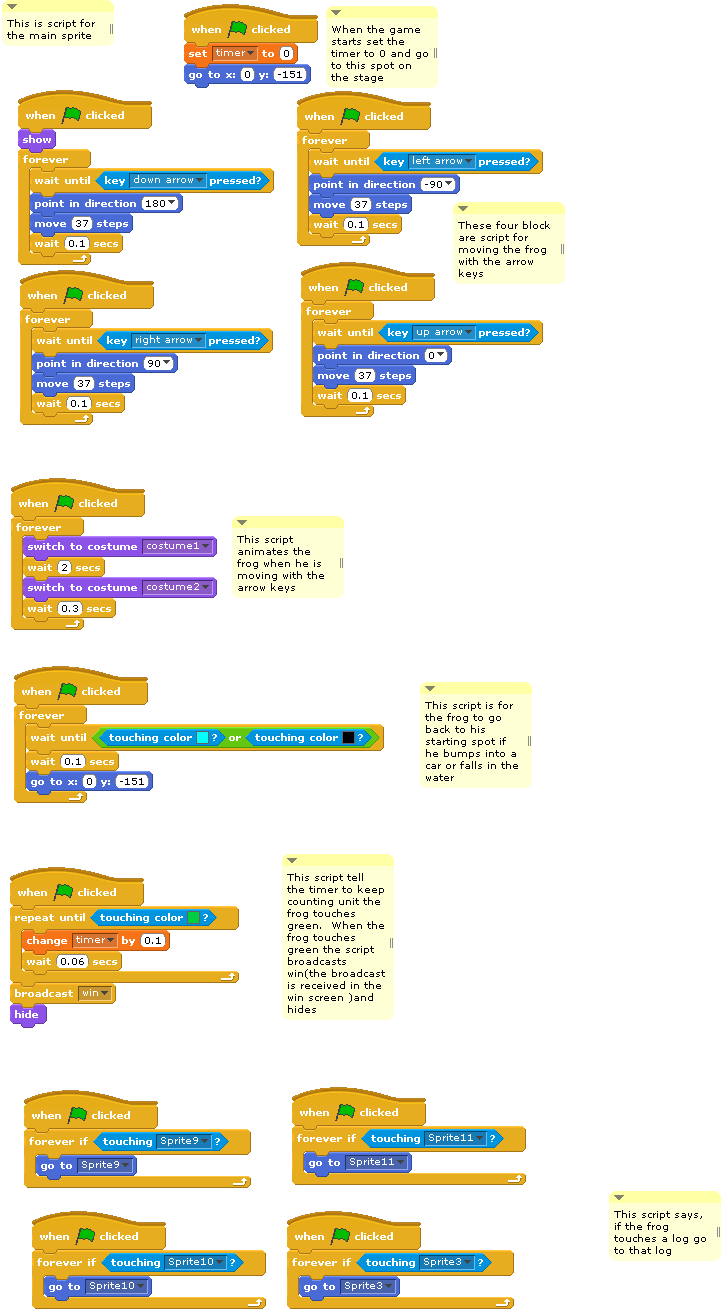
To create a program in Scratch, you need to think systematically about the order of steps.
Give an example of a sequence in a block of script.
You can look at the script below for your example.
This script is for the frog. There are explanations next to the blocks of script.
This is just one way to write the script. You may have found another way to achieve similar results
You may want to try to add some sound to your game. I won't take off if you don't but it may make your game more "Exceptional" Here's a link to Public Domain sounds
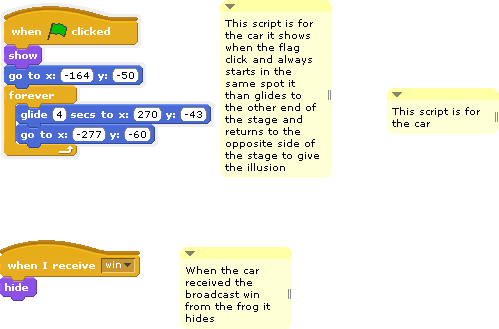
Script for one of the cars:
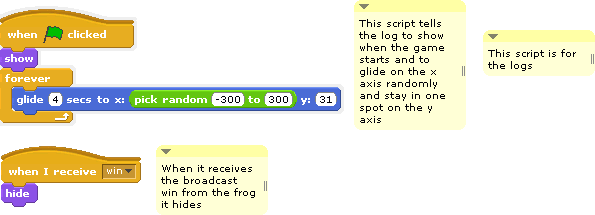
Log script:
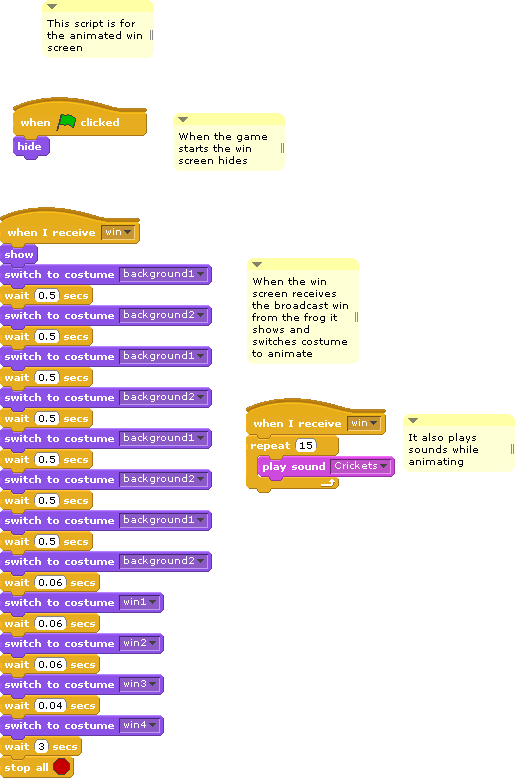
Win Screen:
Today:
Check the Rubric on the eett2---->HESSE----->Scratch----->Scratch Rubric Froggerremix.doc
Are you a Beginning, Developing, Proficient, or Exceptional?
Check the catagories
Design-Imported or Original? Story or no story?
Programming-Glitches or debugged and running without a hitch?
Process-Did you make a storyboard and use your time wisely? No 2 point deductions for being off task?
Sunday, November 27, 2011
Final Days to Finish Frogger Remix
Objective: To be able to give an objective evaluation of a game using the provided rubric

**If you are finished, go to GameStar Mechanic in Game Alley and search "maze". Play some of the maze games. You will be creating mazes games in GameStar and Scratch for your final projects. As part of your preproduction work you must play different maze games as your research. Notice the various Goals and Objectives you can apply to maze games making each one unique. Leave constructive feedback on the games that you play. What works, what doesn't?
***Announcement!
Scholastic is having its annual Art and Writing Awards 2012
There is a catagory for video game design click here to learn more
Bellwork:
Download this game and evaluate using the Frogger Rubric in the eett2----->HESSE---->Scratch folder
Download this game and evaluate using the Frogger Rubric in the eett2----->HESSE---->Scratch folder
Today: You will use the Frogger Rubric to finish up your game. Check the criteria in the rubric to make sure you meet all of the requirements.
**If you are finished, go to GameStar Mechanic in Game Alley and search "maze". Play some of the maze games. You will be creating mazes games in GameStar and Scratch for your final projects. As part of your preproduction work you must play different maze games as your research. Notice the various Goals and Objectives you can apply to maze games making each one unique. Leave constructive feedback on the games that you play. What works, what doesn't?
***Announcement!
Scholastic is having its annual Art and Writing Awards 2012
There is a catagory for video game design click here to learn more
Friday, November 25, 2011
The Scholastic Arts and Alliance Awards
Scholastic Arts is having its annual Art and Writing Competition.
There is a Video Game category!!
You may use Gamestar Mechanic of Scratch to create your games. Work may be individual or collaborative!
Here is the website for specific instructions on how to enter
I hope you will consider entering games you have made in class or any games that you have made outside of class.
There is a Video Game category!!
You may use Gamestar Mechanic of Scratch to create your games. Work may be individual or collaborative!
Here is the website for specific instructions on how to enter
I hope you will consider entering games you have made in class or any games that you have made outside of class.
Tuesday, November 22, 2011
Some Student Games to play on Thanksgiving
I'll be checking the Scratch website this week. If you post a finished game I'll try to add it to the post.
Happy Thanksgiving!
 Brittany's Game
 Alec's game
 Tim's game
 Alex's Game
 Wesley's Game
Happy Thanksgiving!
Brittany's GameAlec's gameTim's gameAlex's GameWesley's Game
Using Sensing Blocks in your Game
Bellwork:
Take a few minutes to watch this video tutorial on LEARNSCRATCH.ORG
There are two parts to this video watch BOTH
They ilustrate the use of the sensing blocks (Touching and Over & Reporting distance)
Can you apply these functions to the game that you are making?
Today:
Continue working on your Frogger Remix Game
If you have finished You will do a chapter exercise in Scratch Programming for teens
If you have done Extra Credit work Please make a folder within your folder in the HESSE---->Scratch---->Period_----->yourfolder----EC
name it EC so that I can easily go to that folder and give you extra credit:)
You will only receive extra credit if you have completed all of your required assignments (that includeds bellwork assignments)
Take a few minutes to watch this video tutorial on LEARNSCRATCH.ORG
There are two parts to this video watch BOTH
They ilustrate the use of the sensing blocks (Touching and Over & Reporting distance)
Can you apply these functions to the game that you are making?
Today:
Continue working on your Frogger Remix Game
If you have finished You will do a chapter exercise in Scratch Programming for teens
If you have done Extra Credit work Please make a folder within your folder in the HESSE---->Scratch---->Period_----->yourfolder----EC
name it EC so that I can easily go to that folder and give you extra credit:)
You will only receive extra credit if you have completed all of your required assignments (that includeds bellwork assignments)
Sunday, November 20, 2011
Logic Operations in Scratch
Objective:
Watch the video tutorial on Logic Operations on LearnScratch.org1.To understand how to use logic operation blocks in Scratch and to apply them to your game.
2. To complete your Frogger game, check for glitches, and troubleshoot to fix problems within your game.
Bellwork:
What are the three logic functions?
What is boolean logic?
How might you use it in your Frogger game?
Today:
Continue working on your Frogger game. You will have today and tomorrow to finish your game. If you do not finish you may work on it at home over the Thanksgiving break. When we return next week we will start a new project.
November Vocabulary words:
URL:
Server:
Software:
Troubleshoot:
Width:
Vertical:
Solar Energy:
Sustainable:
Rotation:
Variable:
Friday, November 18, 2011
Establishing a Rubric for Frogger Remix
Bellwork:
Go to Wordstash and click on November Vocabulary Words---->practice mode---->multiple choice
Today:
We will create a list of criteria for grading your Frogger Remix Project;
1. Open a blank word document
2. Title it Frogger Rubric
3. File---->Save as---->my computer---->eett2-----HESSE----->Scratch----Period_----->your folder---->save
4. Write a list of the things you think should be considered when grading this project.
5. Be prepared to share your list with the class.
You will continue working on your Frogger Remix Game in Scratch. At this point you should have most if not all of your graphics (sprites, background) done.
Here is a portion of the script you may need for the main character sprite:
Your main character will move using the arrow keys Here is one block of script:

Click to enlarge
Your main character will hit something and have to go back to the beginning:

Click to enlarge
Go to Wordstash and click on November Vocabulary Words---->practice mode---->multiple choice
Today:
We will create a list of criteria for grading your Frogger Remix Project;
1. Open a blank word document
2. Title it Frogger Rubric
3. File---->Save as---->my computer---->eett2-----HESSE----->Scratch----Period_----->your folder---->save
4. Write a list of the things you think should be considered when grading this project.
5. Be prepared to share your list with the class.
You will continue working on your Frogger Remix Game in Scratch. At this point you should have most if not all of your graphics (sprites, background) done.
Here is a portion of the script you may need for the main character sprite:
Your main character will move using the arrow keys Here is one block of script:
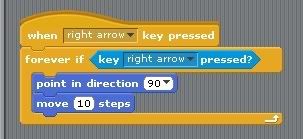
Click to enlarge
Your main character will hit something and have to go back to the beginning:
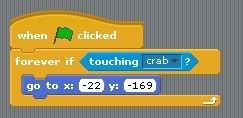
Click to enlarge
Wednesday, November 16, 2011
November vocabulary words
Bellwork:
GO to edcreate.com log in with password period 7
Do the November Vocabulary Words hangman
Next go to http://wordstash.com/academic_classes/917
Sign up
Create a user name
Your user name must be your firstnamelastinitialP4 (or P5, P6, P2, P3)
You will continure working on your frogger remix game.
GO to edcreate.com log in with password period 7
Do the November Vocabulary Words hangman
Next go to http://wordstash.com/academic_classes/917
Sign up
Create a user name
Your user name must be your firstnamelastinitialP4 (or P5, P6, P2, P3)
You will continure working on your frogger remix game.